Security Architecture: Mutual TLS, Encryption, Credential Handling and RBAC
How GraphnAI secures identity data with outbound-only bridges, mutual TLS (mTLS), AES-256-GCM encryption, credential handling and role-based access control (RBAC).
On this page
Overview
GraphnAI is built on the assumption that any layer can be breached. It limits what each layer can reach, encrypts what it stores, and checks every access.
Three principles shape the design:
- Outbound-only connectivity: connecting your on-premises directories needs no inbound firewall ports.
- Mutual authentication for bridges: every bridge proves its identity with a client certificate, and GraphnAI proves its own (mTLS).
- Protected credentials: service account credentials are encrypted with keys that never enter the database.
Network Architecture
GraphnAI connects to your directory infrastructure without exposing it to the internet.
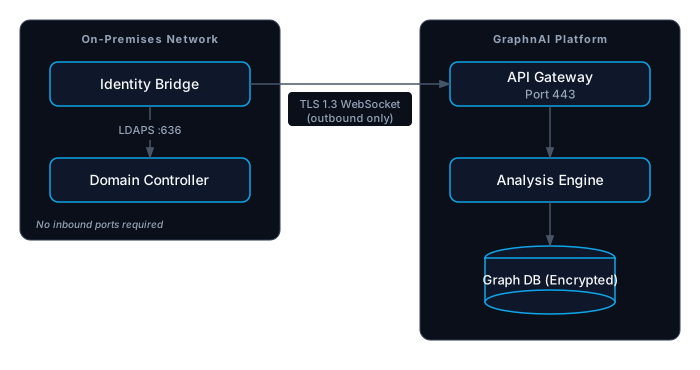
The Identity Bridge
The Identity Bridge is a container agent that sits between your Active Directory and GraphnAI.
- Outbound-only: the bridge opens every connection to GraphnAI. It needs no inbound firewall rules, VPN or perimeter network.
- Protocol: the bridge holds a WebSocket connection over TLS 1.3 to GraphnAI's bridge port, 8443.
- Configuration: the bridge keeps no directory settings of its own. It receives them from GraphnAI each time it connects. On disk it keeps only its sync progress.
Encryption & Cryptography
Data in Transit
Every network connection is encrypted.
- Bridge to GraphnAI: mutual TLS 1.3 with ECDSA P-256 certificates. GraphnAI runs a private certificate authority that issues each bridge a client certificate, valid for one year.
- Browser to GraphnAI: HTTPS. When GraphnAI terminates TLS itself, it accepts TLS 1.3 only.
- Collectors to GraphnAI: HTTPS on port 443 with an API key, or through a bridge. See API Key Management.
- Bridge to Active Directory: LDAPS on port 636 by default. The bridge uses plain LDAP on port 389 only for a domain where you turn TLS off. Do that only in a lab.
- Directory sign-in to Active Directory: an LDAP bind over LDAPS only. There is no plain-text option.
Data at Rest
- Database: GraphnAI keeps the identity graph in its database. Encrypting the database's disk is part of your deployment.
- Secrets: service account passwords, identity provider client secrets and AI provider keys are encrypted with AES-256-GCM before they're written to the database.
- API keys: GraphnAI stores only a SHA-256 hash of each key.
- Key management: at first start, GraphnAI creates a root key in its data directory, and derives every encryption and session-signing key from it. No key is stored in the database, so a stolen database backup can't decrypt credentials or forge a session.
Back up the data directory with the server. If the root key is lost, GraphnAI creates a new one at the next start, and you enter the stored secrets again.
Credential Handling
GraphnAI needs read access to your directory, so it holds service account credentials. It treats them as toxic data.
- Encrypted at rest: GraphnAI stores each credential encrypted, as described above.
- Held in memory on the bridge: GraphnAI sends a bridge its credentials over the mutual TLS connection. The bridge keeps them in memory (RAM) only.
- Never written to the bridge's disk: when the bridge stops, the credentials are gone from it.
- Separate per domain: each domain has its own service account credential.
- Separate for sign-in: directory sign-in has its own service account.
Access Control
User Sign-In
GraphnAI never stores user passwords. People sign in one of two ways:
- Through an OpenID Connect (OIDC) identity provider, such as Entra ID, Okta or Amazon Cognito. Your provider enforces multifactor authentication (MFA) and its sign-in policies before the person reaches GraphnAI.
- With directory sign-in, which checks a username and password against your Active Directory over LDAPS. GraphnAI passes the password to AD and keeps no copy. This method checks the password only, so your identity provider's MFA doesn't apply to it.
See On-Premises Directory Sign-In for its lockout and enumeration protections.
Sessions
- Every sign-in creates a session tracked on the server. Its cookie is HttpOnly, SameSite=Lax, and Secure over HTTPS.
- Signing out ends the session on the server at once. A role change or removal ends a person's sessions at once too.
- Admins set how long sessions last and when inactive people are signed out. See Profile & Sessions.
Role-Based Access Control (RBAC)
The server checks the role on every request.
| Role | Capabilities |
|---|---|
| Viewer | Browse the graph and search it. Can't see analysis or configuration, or run simulations. |
| Operator | Analysis and detection, simulations and syncs, and fixes from a Critical or High finding plan. Can't change configuration. |
| Admin | Everything, including users, bridges, identity providers, API keys, and fixes they build themselves. |
An API key gets a role from its scopes and is checked the same way. See API Key Management.
Application Security
Software Supply Chain
- Container images: built on minimal Alpine Linux base images, which keeps the attack surface small.
- Versioned releases: each release carries a semantic version tag, and each binary records its version and source commit.
- Pinned build steps: the release build pins every third-party build action to a fixed commit.
Remediation Safety (Select Fire™)
Guardrails stop accidental or malicious damage to directory data when GraphnAI makes a fix.
- Checks before every change: every fix passes through the Select Fire gateway. It checks the deny list, the objects automation never acts on, and scores the change's blast radius before anything is written.
- A person authorizes each action: an Operator can run only fixes built from a Critical or High finding plan, tied to that exact change and to that Operator. Admins can also run fixes they build themselves.
- Saved original state: just before a change runs, GraphnAI reads the object's current state and saves it with the action.
- Verification: after the change, GraphnAI reads the object again and records whether the change took effect.
- Audit trail: the remediation ledger records every fix: who ran and authorized it, the change sent, the state before and after, and each status change. Each entry is sealed with an HMAC, so a change to it shows. Finished entries are kept for two years.