Education
Keep up with a directory that turns over every term.
Students, staff, faculty, researchers and student workers churn on different clocks, and a small team keeps up between tickets. GraphnAI shows which identities are stale and which hold more than their peers. It finds the paths to your most sensitive systems in Active Directory and Microsoft Entra ID.
The academic year
Four moments when identities pile up.
- Fall intake
Thousands of accounts go live at once.
New students and staff get accounts, password resets spike, and the help desk is swamped. A busy help desk is good cover for a password spray.
What GraphnAI does Password spray fires when one source fails to log on to five or more accounts in ten minutes. Password spray succeeded fires when a sprayed account then authenticates from that address.
- Mid-term
Access piles up on people who change roles.
Student workers get rights for campus jobs. Faculty join committees, labs and departments, and keep the groups from the last one.
What GraphnAI does With department and title filled in, over-permission analytics compares each identity with its peers, counting what it inherits through nested groups.
- Term end
Students graduate. Their accounts don’t.
Graduates, adjuncts between contracts and visiting scholars leave. Their accounts stay enabled until someone runs a cleanup.
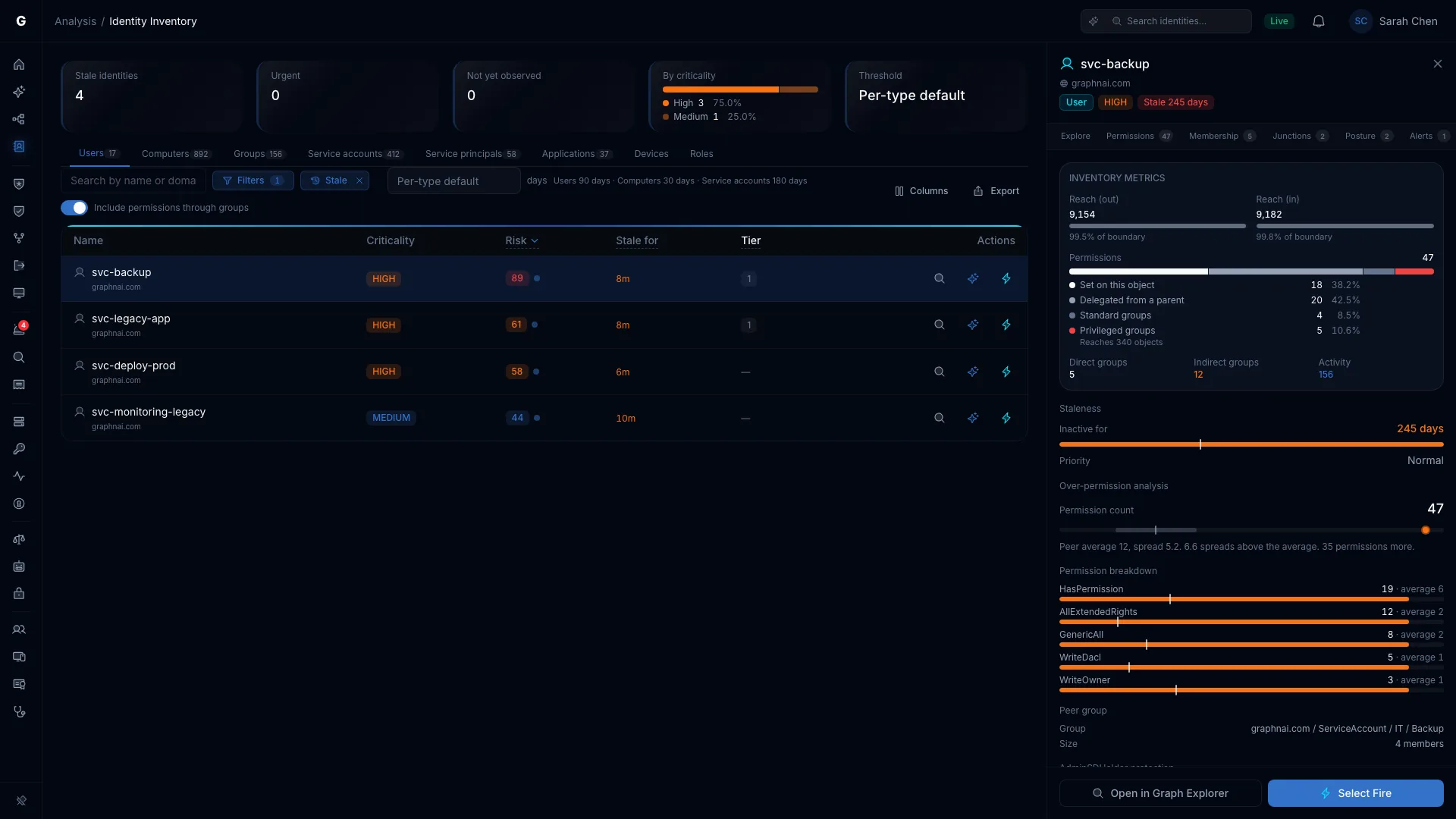
What GraphnAI does The Stale preset lists users idle past 90 days, or past one cutoff you set for an audit. Export it to CSV for department heads to confirm.
- Grant end
The lab’s accounts outlive the grant.
A research group’s service account and its cloud app registration keep their rights after the funding ends.
What GraphnAI does Service accounts go stale after 180 days. The NHI presets list app registrations with no owner or a credential that never expires.
Retire last term’s accounts safely.
The Stale preset sits on the Identity Inventory, so each stale account keeps its risk score, permissions and groups beside it. A stale Tier 0 or Critical account is marked urgent.
Open one to see what it can still reach before you act. Then disable the ones that should go with Select Fire. It simulates the change first, saves the account’s state, and Undo puts it back if something breaks.
Problems that don’t follow the calendar.
Every classroom tool wants tenant-wide consent.
Learning tools, survey apps and plagiarism checkers ask for Microsoft Entra ID permissions. Some get consent for every user in the tenant, and nobody looks at them again.
What GraphnAI doesThe NHI: Consent for all users preset lists the service principals and app registrations holding an OAuth2 permission grant consented for every user. NHI: Orphaned lists the ones with no owner.
Select Fire can remove an OAuth permission grant. It saves the grant first, so Undo can restore it.
The SIS sits a few hops from ordinary accounts.
The registrar, financial aid and a lab’s research assistants often end up in the same nested groups. Any of those groups can be a step on a path to the servers behind your student information system.
What GraphnAI doesRate the servers behind your student information system Critical with a naming rule. Critical Junctions then ranks the accounts where the most attack paths to them meet.
Fix the account at the top, and a whole fan of paths closes at once.
A few people for tens of thousands of identities.
Campus security teams are small. Their busiest weeks are the start of term, when everyone else is busy too. There’s no time to write queries or review every finding by hand.
What GraphnAI doesSecurity Posture runs its checks after every sync, with nothing to turn on. Graphne answers questions in plain language through its own read-only database account, and shows every query it ran.
Semi-Auto runs each fix after you approve it, and every change GraphnAI makes can be undone.
Ask the graph instead of writing the query.
Ask Graphne which service accounts hold more than 50 permissions, or how many identities hold more than their peers. It answers from your own graph, and offers the fix in Select Fire when it finds one.
Open Reasoning to see each tool it called and what came back, or Show AQL for the exact query.
Graphne stays off until an Admin adds an AI provider, and a local model works. A monthly spending ceiling stops AI calls when the budget runs out.
Your identity data stays on your server.
Student and staff identities stay on infrastructure you control.
- GraphnAI runs on your own server, with its own database. We have no standing access to it.
- The Identity Bridge only dials out, over mutual TLS 1.3, so you open no inbound firewall ports.
- The usage report it sends us carries counts, never account names, domain names, hostnames or IP addresses. Every field is documented.
- Graphne, the AI assistant, is off until you choose a model, and that model can run on your own hardware.
Find last term’s leftovers in your own directory.
The Public Preview is free for 30 days from your first sync, on your own server.