Healthcare
Who can reach your clinical systems, and how.
An attacker with one valid account doesn’t need an exploit. A departed contractor’s password or a service account nobody owns is enough to start. GraphnAI maps where those accounts lead in your directories, Active Directory and Microsoft Entra ID. Then it fixes what it finds with changes you can undo.
Where it breaks
The identity problems hospitals inherit.
Admins log on to the same machines as everyone else.
A workstation on a nursing unit serves a whole shift of clinicians. When a domain admin logs on to fix it, their credential can stay in memory. Any account with SeDebugPrivilege on that computer can take it.
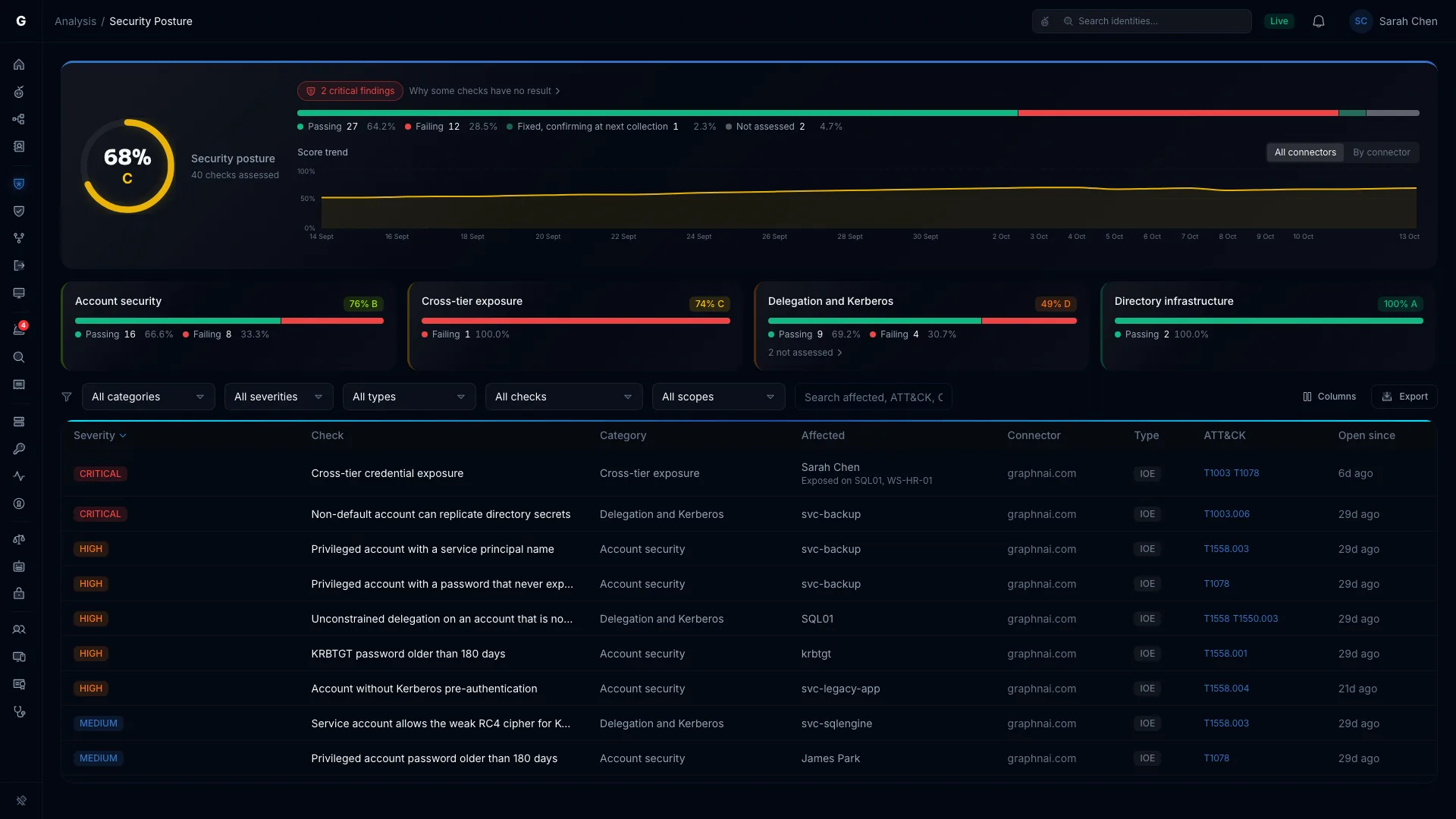
What GraphnAI doesCross-tier credential exposure finds the computers where a Tier 0 credential sits in memory and a lower-tier account holds the privileges to dump it. It reads the logon events your collectors forward, so every finding is Validated.
Local Administrators lists the local admin, Remote Desktop and PowerShell Remoting rights your GPOs grant on each computer, and which GPO grants each one.
The accounts behind the EHR got broad rights at go-live.
Interface engines, PACS, pharmacy and lab systems each run under a service account. Many were given wide rights to make go-live, with passwords that never change. Nobody touches them, because nobody knows what would break.
What GraphnAI doesEvery user account with a service principal name moves to the Service accounts tab. The NHI: Kerberoastable preset lists the ones whose password never expires, and over-permission analytics compares each one with its peers.
Before you change one, Select Fire simulates the change on your live graph. You see what the account stops reaching and who loses access, and nothing changes in the directory until you decide.
Locums, agency staff and vendor engineers come and go.
Accounts are created fast for each new rotation and disabled slowly, if at all. A vendor’s support account can sit unused for a year and still work.
What GraphnAI doesThe Stale preset lists users idle past 90 days, service accounts past 180 and computers past 30, or one cutoff you set. A stale Tier 0 or Critical account is marked urgent.
When one account re-enables another or resets its password, the Account manipulation rule raises an alert from your domain controllers’ events.
Every acquisition brought its own domain.
A health system built by acquisition runs forests, trusts and tenants nobody has fully mapped. A trust with weak SID filtering can let whoever controls one domain escalate into another.
What GraphnAI doesOne Identity Bridge can sync several domains and forests, and it only dials out. GraphnAI reads every trust on every sync and flags the ones an attacker can escalate across.
Boundary Escape lists the identities that can reach into another forest or your Entra ID tenant. The classic case is an on-premises account that pivots through Entra Connect.
Rate what keeps care running as Critical.
GraphnAI finds Tier 0 on its own: Domain Admins, domain controllers and the servers that host your certificate authorities. It also finds the accounts that reach them through nested groups.
Add a naming rule for the servers behind your EHR, imaging and pharmacy systems, and they’re rated Critical too. Critical Junctions then ranks the accounts where the most attack paths to them meet.
Security Posture runs its checks after every sync, with nothing to turn on. One flags any lower-tier account that can edit a Group Policy object applied to your Tier 0 computers. A GPO runs on every computer it reaches, which makes it a common way to push ransomware.
When a clinical service account is targeted.
Kerberoasting needs no privileges. Any domain account can request a service ticket for an account with a service principal name, then crack it offline.
GraphnAI reads the security events your domain controllers write. It alerts on Kerberoasting, password spray, brute force, DCSync and changes to Tier 0 groups. Each alert names the account, its tier and how many attack paths lead from it to Tier 0.
Triage judges every alert against the identity behind it. A Tier 0 or Tier 1 account always goes to a person.
Fix it without interrupting care.
Removing one permission from an interface account could stop lab results reaching the pharmacy. Select Fire shows the blast radius before anything changes, then lets you choose how the change runs.
Full-Auto stays off until an Admin arms it. Even then, it never removes a permission or a membership on its own, and never acts on a Tier 0 or Tier 1 account. Closed-Loop Rollback watches the hosts that depend on each account it changes. If they start failing, a hygiene change is undone on its own, and a containment goes to a person.
- Simulate. See what the account stops reaching, who loses a path through it, and an Operational Safety Metric score from 0 to 100.
- Decide. Safe Mode writes a PowerShell script you review and run yourself. Semi-Auto runs each change after you authorize it.
- Undo. GraphnAI saves the original state before every change, and Undo restores it through the same checked path.
Your identity data stays on your server.
The map of who can reach your clinical systems lives on your server, not ours.
- GraphnAI runs on your own server, with its own database. We have no standing access to it.
- The Identity Bridge only dials out, over mutual TLS 1.3, so you open no inbound firewall ports.
- The usage report it sends us carries counts, never account names, domain names, hostnames or IP addresses. Every field is documented.
- Graphne, the AI assistant, is off until you choose a model, and that model can run on your own hardware.
See who can reach your clinical systems.
The Public Preview is free for 30 days from your first sync, on your own server.