Government
The tier model on paper, checked against the directory.
Agency directories carry decades of history: forests upgraded in place, trusts from past reorganizations and contractor accounts nobody retired. GraphnAI shows where tier boundaries break in Active Directory and Microsoft Entra ID, and it runs on your own server.
Tier model
Where tier boundaries break.
Zero Trust programs, such as those under OMB M-22-09, start with identity. The first question is whether your tiers hold. These checks answer it.
A lower-tier account can edit a GPO that applies to domain controllers.
A Critical Group Policy check. The finding lists who can edit the policy and how many Tier 0 computers it reaches. Group Policy checks guide
A lower-tier account can link Group Policy above Tier 0 computers.
A High Group Policy check. Select Fire removes the link permission where it was granted, once you approve it. Group Policy checks guide
A GPO grants debug or backup rights to a lower-tier account.
A Group Policy check, Critical when the policy applies to Tier 0 computers. Group Policy checks guide
A help desk group holds rights over an OU on a higher plane.
Delegation Risk flags the cross-plane delegation and scores the container against best practice. Delegation Risk guide
A computer or a group sits directly in a Tier 0 administrative group.
An account security check, High when the member is a computer or holds computers. Account security checks guide
A Tier 0 admin logs on to a workstation where another account holds SeDebugPrivilege.
Cross-tier credential exposure, Critical and Validated, from the logon events your collectors forward. Cross-tier credential exposure guide
Any user can request a certificate that names a domain admin.
AD CS escalation paths for ESC1, ESC3, ESC4, ESC5 and ESC13. A computer that hosts an enterprise CA is rated Tier 0. AD CS escalation paths guide
An account reaches Tier 0 through nested groups nobody reviews.
The Asset Criticality Engine follows nested groups up to ten hops. Critical Junctions ranks the accounts where the most paths meet. Critical Junctions guide
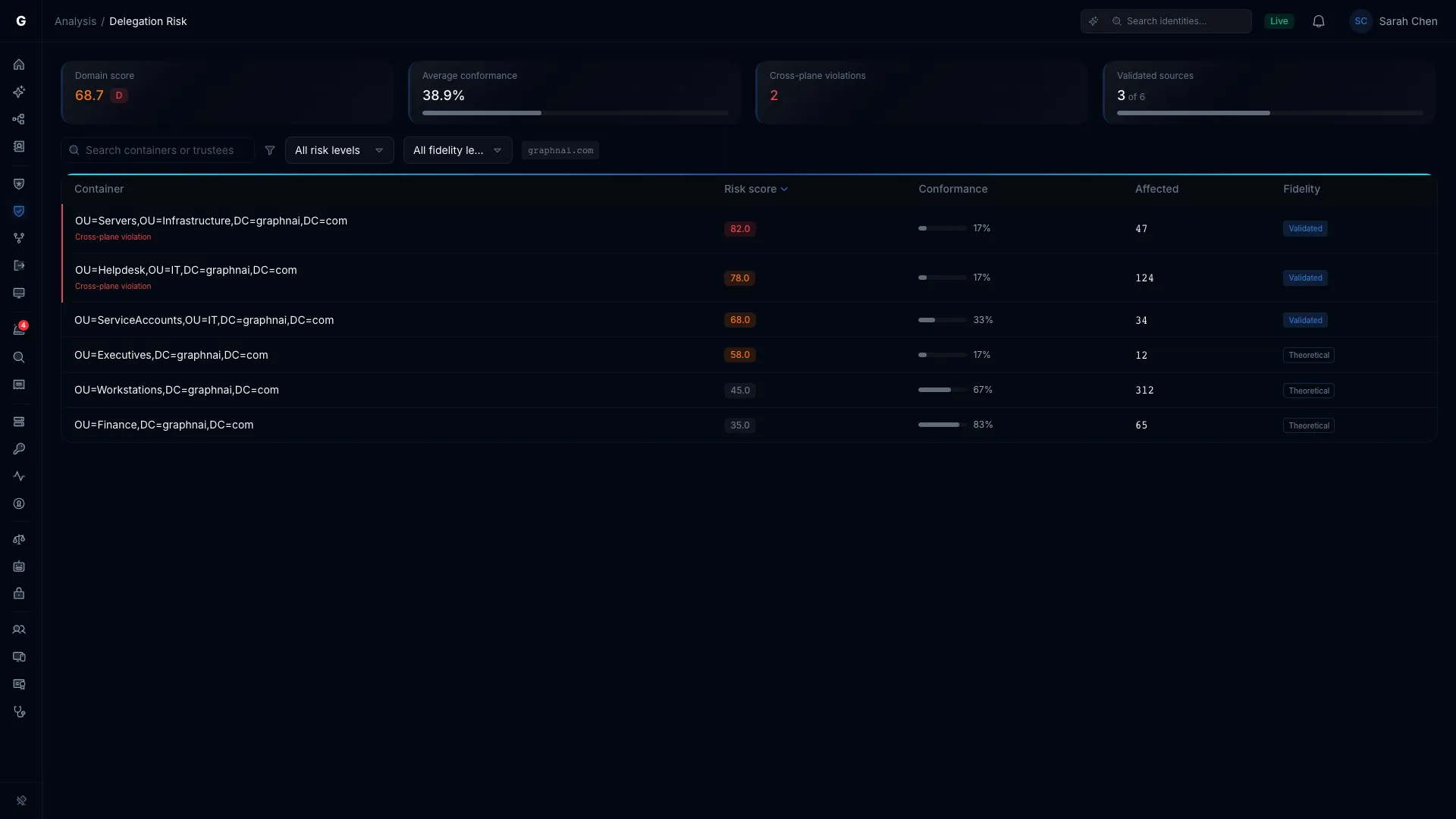
Logon restrictions, checked.
The tier model keeps Tier 0 accounts off lower-tier computers with Deny log on rights in Group Policy. GraphnAI reads the ones that block network and Remote Desktop logons. It works out which GPO wins on each computer the way Windows does.
Local Administrators lists every local admin, Remote Desktop and PowerShell Remoting right that Group Policy grants in a domain, with the GPO that delivers it. Each grant carries its own level of evidence.
- TheoreticalA GPO names the account for the local group.
- ConstrainedGraphnAI checked whether the policy reaches this computer, or whether a Deny log on right blocks the account there.
- ValidatedThat same account made a privileged logon on that computer.
What decades of directory leave behind.
Old defaults survive every in-place upgrade.
Forests upgraded in place carry their history: DES-only accounts, reversible encryption, LAN Manager hashes and passwords stored in Group Policy Preferences.
What GraphnAI doesSecurity Posture checks for all of them after every sync. It also flags NTLMv1, LLMNR left on, privileged SIDs in sIDHistory and a KRBTGT password older than 180 days.
Each failing check says why it matters, how to fix it and which ATT&CK technique it maps to.
Trusts outlive the reorganizations that made them.
Agencies merge, split and share services, and the trusts stay. An external trust with SID filtering off, or a forest trust relaxed for a migration, lets privileges cross.
What GraphnAI doesGraphnAI reads every trust on every sync. It flags a cross-forest trust only when its filtering is weak, so a healthy trust never buries a real finding. Inside a forest, every trust that isn’t quarantined counts as an escalation, because the forest is the boundary.
A trust created, removed or changed raises a Trust manipulation alert.
The task order ends. The account doesn’t.
Integrators get accounts, delegations and sometimes Tier 0 rights for a project. When the contract ends, the access often stays, and so do the service accounts they built.
What GraphnAI doesThe Stale preset finds idle accounts by type and marks dormant Tier 0 and Critical accounts urgent. Service accounts get their own tab, with what each one can reach.
A privileged account created in the last 10 days fails its own check, so a new admin gets confirmed while the change is fresh.
After an incident, you need one account’s whole story.
Responders need every logon, privilege use and alert for one identity, in order, without stitching together exports from every domain controller.
What GraphnAI doesThe Identity Timeline lays out one identity’s sessions, alerts and events against its own 30-day baseline. Activity outside that pattern is tinted orange.
Investigations write a report on one identity in five steps, with the evidence behind each finding. Reports are kept for a year.
Every failing check names the account and the fix.
Each area of Security Posture gets its own grade. Open a failing check, and the affected account’s blast radius opens beside it.
When a fix lands, the check marks it fixed and confirms it at the next collection. A check that can’t run says Not assessed and names the reason. It never reads Passing.
Identity data stays on your network.
Who can administer what is some of the most sensitive data an agency holds. GraphnAI keeps it on infrastructure you control.
- GraphnAI runs on your own server, with its own database. We have no standing access to it.
- The Identity Bridge only dials out, over mutual TLS 1.3, so you open no inbound firewall ports.
- The usage report it sends us carries counts, never account names, domain names, hostnames or IP addresses. Every field is documented.
- Graphne, the AI assistant, is off until you choose a model, and that model can run on your own hardware.
- The service account passwords GraphnAI syncs with are encrypted with AES-256-GCM, with keys derived from a root key that never enters the database.
- People sign in through your own OpenID Connect provider and its MFA, or against Active Directory over LDAPS.
- On paid plans, usage reporting stays off until an administrator turns it on. A deployment that can’t reach us keeps working.
- Support sees your deployment only with a key you apply. Access is read-only, expires on its own, and everyone sees a banner while it’s active.
Check your tier model on your own server.
The Public Preview is free for 30 days from your first sync, on your own server.